

After successfully decoding the large static byte array in PrivateImplementationDetails in Part 1, we uncovered internal references to an encrypted configuration file: blackwood.dll.config (MD5: 03cffb8c4aa5113de6034fb82af529e6). This file is not embedded in the binary, but rather exists alongside the DLL on disk, and it contains runtime parameters essential to the malware’s operation. Unlike the obfuscation seen in the static byte array, this file is encrypted using the RC4 stream cipher and is loaded and decrypted dynamically during execution.
Thus, finding and opening the file in a live system would not be useful. Understanding how the malware decrypts this file is a key step in uncovering its operational logic without executing it.
Where the decryption begins: ConfigReader
The file blackwood.dll.conf is accessed via the ConfigReader.GetValue() method. The logic starts with a simple check to determine whether the malware is running as a DLL.

Figure <!– [if supportFields]> SEQ Figure * ARABIC <![endif]–>1<!– [if supportFields]><![endif]–>: Encrypted content of the config file
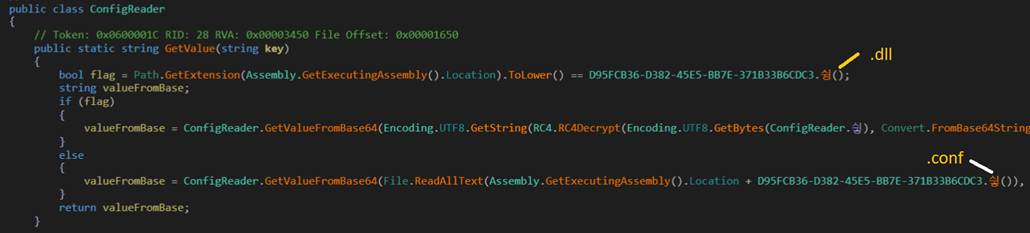
Figure <!– [if supportFields]> SEQ Figure * ARABIC <![endif]–>2<!– [if supportFields]><![endif]–>: ConfigReader snippet
This line acts as a conditional gate, only if the current file extension ends in .dll will the RC4 decryption routine be executed. Otherwise, the malware skips decryption entirely.
To construct the path to the encrypted config file, the malware uses a helper method called 싛() which resolves the string “.conf”. Combined with the executing file name (blackwood.dll), this results in blackwood.dll.conf. This .dll.conf naming scheme is critical as it avoids hardcoding the config file name anywhere in the file and ensures that the malware adapts dynamically based on how it’s deployed. Without this exact file in the same directory, the decryption will fail.
RC4 Decryption Logic
If the .dll check passes, the code reads and decrypts the config as shown below:

Figure <!– [if supportFields]> SEQ Figure * ARABIC <![endif]–>3<!– [if supportFields]><![endif]–>: Decryption routine
Here’s what happens step by step:
- Config file contents are read from blackwood.dll.conf and Base64-decoded.
- The decoded byte array is decrypted using RC4, with the key being the value of ConfigReader.싛, which was resolved in Part 1 from the XOR-obfuscated byte array.
- The resulting plaintext is UTF-8 decoded, resulting in a human-readable configuration string that is parsed by the GetValueFromBase64() method.
Deriving the RC4 key
We traced a helper function call that returned the RC4 decryption key, which led us to the exact location of that key inside a large static byte array stored inside the PrivateImplementationDetails. The function call passed specific parameters (index = 90, count = 22) that pointed to the decryption key’s position. Because arrays in .NET are zero-based (meaning the first element has index 0, not 1), these parameters extracted 22 bytes starting from the 91st byte in the array. Now we know exactly the location of the RC4 key.

Figure <!– [if supportFields]> SEQ Figure * ARABIC <![endif]–>4<!– [if supportFields]><![endif]–>: Snippet of the helper function referencing the RC4 key

Figure <!– [if supportFields]> SEQ Figure * ARABIC <![endif]–>5<!– [if supportFields]><![endif]–>: RC4 key location
The final decryption is handled by the RC4Decrypt() method, which acts as a wrapper around the obfuscated RC4 routine. It takes the derived key and encrypted data as inputs, passes them to the underlying algorithm, and returns the decrypted bytes.

Figure <!– [if supportFields]> SEQ Figure * ARABIC <![endif]–>6<!– [if supportFields]><![endif]–>: RC4Decrypt method
Completing the decryption
To validate our static analysis and test the decryption flow, we replicated the malware’s RC4 logic in a standalone script. As confirmed in earlier stages, the decryption key is derived from the decoded static byte array and is hardcoded as the string:
My name is Blackwood !
Using this key, we wrote a simple C# program to decrypt the base64-encoded configuration file. Here’s a trimmed snippet of that program:
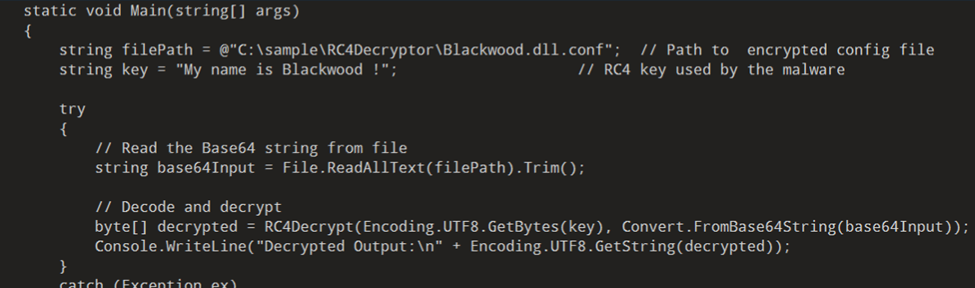
Figure <!– [if supportFields]> SEQ Figure * ARABIC <![endif]–>7<!– [if supportFields]><![endif]–>: decryption code snippet
After running this script, we successfully retrieved the plaintext contents of blackwood.dll. conf. The decrypted output revealed multiple key-value pairs governing the malware’s tunneling behavior in client mode. A key indicator was client_server=http://[redacted]:80, which identifies the C2 endpoint, the malware connects to for command and control. This, along with flags such as client_socks5auth, client_proxy, and client_command, confirms that the malware functions as a remote-controlled tunneling client capable of proxying traffic or establishing covert channels over HTTP.
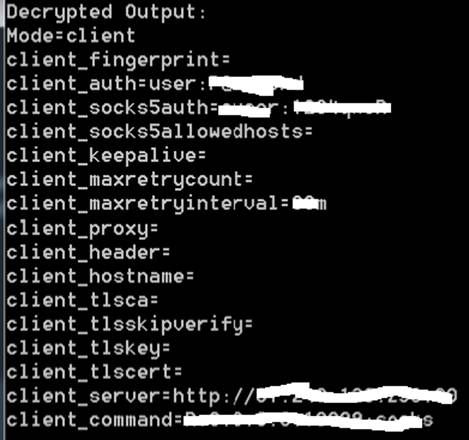
Figure <!– [if supportFields]> SEQ Figure * ARABIC <![endif]–>8<!– [if supportFields]><![endif]–>: Decrypted config file
The use of an external RC4-encrypted configuration file allows the malware to decouple static logic from runtime behavior, making it harder for sandboxes or static analysis tools to quickly determine intent without full execution. Additionally, the presence of a hardcoded RC4 key string “My name is Blackwood !” serves as both an internal debug marker and a distinctive signature that links this sample to a broader tooling infrastructure likely reused across different campaigns.
These findings validate the earlier decoding work and complete the analysis chain, from static obfuscation to runtime decryption, to full configuration reconstruction. With this knowledge, we can now create targeted detection rules based on RC4 key indicators, file naming patterns such as .dll.conf, decoded parameter structure and known C2 endpoints.
Analysis techniques
- Locate and extract external configuration files dropped with the malware.
- Identify the decryption algorithm (e.g., RC4) and any hardcoded keys or markers.
- Replicate the decryption logic in a standalone script to recover plaintext config.
- Review decrypted key–value pairs to map out C2 servers, tunneling settings, and proxy options.
- Correlate config values with observed network behavior during execution.
Hunting query and YARA rules
1. Detect blackwood.dll and blackwood.dll.conf in the same directory.

Figure <!– [if supportFields]> SEQ Figure * ARABIC <![endif]–>9<!– [if supportFields]><![endif]–>: EDR query
2. YARA Rule – YARA rule detects known Blackwood artifacts by combining filename and MD5 hash validation for both the DLL and its associated configuration file.
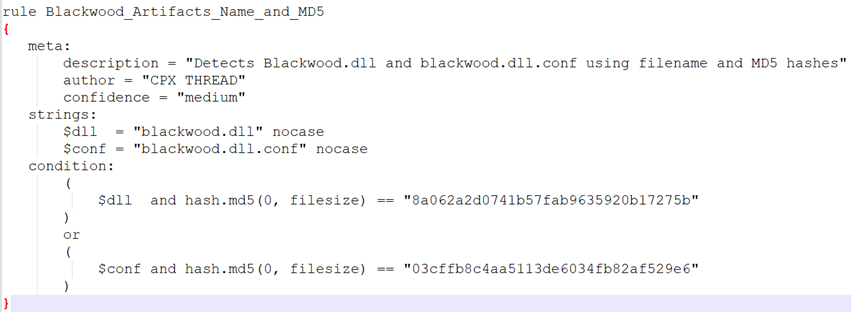
Figure <!– [if supportFields]> SEQ Figure * ARABIC <![endif]–>10<!– [if supportFields]><![endif]–>: YARA rule
3. YARA Rule – YARA rule detects the Blackwood DLL based on multiple unique strings observed directly in the binary, including its loader component and in-memory module handling logic.
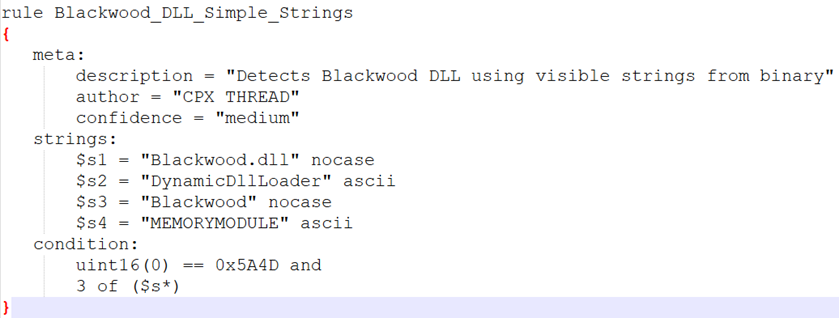
Figure <!– [if supportFields]> SEQ Figure * ARABIC <![endif]–>11<!– [if supportFields]><![endif]–>: YARA rule